Blog
How to Program a Garage Door Opener: Complete Guide
Author
Ray
Published
Category
Automatic Door Opener
Learn how to program a garage door opener, remote, keypad, and HomeLink. Follow step-by-step instructions and troubleshoot common programming problems.


Author
Ray
An experienced automation specialist with a strong background in motor technology and industrial solutions. With years of expertise in central motors, tubular motors, and automation systems, the author is dedicated to sharing insights that connect engineering innovation with real-world applications. Passionate about advancing reliable, energy-efficient, and high-performance automation products for global markets.
What’s better than insider perks, pro tips, and surprises?
Sign up to get the most recent blog articles in your email every week.
Join now.
WHY I WRITE THIS
About my business
Our company’s main product lines include tubular motors, sliding gate motors, swing gate motors, roller shutter motors, and other door automation solutions, all manufactured by trusted partner factories we have worked with for many years.
Our Services
I help them with sales and export operations, while our company also provides sourcing and procurement services in China to help international clients solve supply-related challenges. If you need assistance with procurement, please feel free to contact us.
Programming a garage door opener is usually a straightforward process, but the exact procedure depends on the opener model, remote control, security technology, and accessory you are trying to connect.
Whether you are replacing a lost remote, adding an extra remote, setting up a wireless keypad, or connecting your vehicle's HomeLink system, most modern garage door openers use a similar pairing concept. The opener's motor unit contains a receiver that learns and stores the code or wireless signal from an authorized control device.
In many modern systems, you can start programming by locating the Learn, Program, or Smart button on the opener and then pairing the remote or other device. However, programming sequences vary by manufacturer and model. LiftMaster and Chamberlain, for example, use different security generations and remote compatibility requirements, while Genie uses its own Intellicode technology.
This guide explains how to program a garage door opener step by step, including remote controls, wireless keypads, vehicle-based HomeLink systems, older fixed-code openers, and common troubleshooting methods.
Safety Note: The garage door may move during programming. Make sure the doorway and surrounding area are completely clear before beginning. Always follow the instructions for your specific opener model when they differ from the general steps below.
What Does Programming a Garage Door Opener Mean?
Programming a garage door opener means pairing a remote control, keypad, vehicle control system, or other authorized device with the receiver in the garage door opener.
A typical automatic garage door opener includes several major components:
Electric motor and drive system
Control board
Wireless receiver
Wall-mounted controls
Remote controls
Optional keypads and other wireless accessories
When a new remote is programmed, the opener stores information that allows it to recognize the authorized wireless signal.
Rolling-Code Technology
Many modern garage door openers use rolling-code technology. Instead of sending exactly the same access code every time, the system changes the transmitted code according to its security protocol.
Genie, for example, uses Intellicode rolling-code technology, while LiftMaster uses several generations of Security technology across its product range.
Rolling-code technology improves security because a previously transmitted wireless code is not simply reused as a permanent access code.
Fixed-Code Garage Door Openers
Older garage door openers may use fixed-code systems rather than modern rolling-code technology.
Some older systems use DIP switches, with matching switch positions on the opener and remote. In these systems, programming a remote can involve matching the switch configuration rather than using a modern Learn button.
If your opener does not have a Learn, Program, or Smart button, identify the model number and check the manufacturer's documentation before attempting to program a replacement remote.
What to Check Before Programming a Garage Door Opener
Before starting the programming process, confirm that the remote or accessory is compatible with your garage door opener.
Identify Your Garage Door Opener
Check the following information:
Manufacturer
Model number
Approximate production year
Security technology
Learn or Program button
Remote model number
The exact location and function of the programming button can vary between opener generations.
Check Remote Compatibility
A remote that looks similar to your original remote is not necessarily compatible with your garage door opener.
Compatibility can depend on:
Frequency
Wireless technology
Security-code generation
Opener model
Remote model
For example, current Chamberlain and LiftMaster products can use different security generations, so checking compatibility before purchasing a replacement remote is important.
How to Program a Garage Door Opener Remote
For many modern garage door openers, programming a new handheld remote follows a basic sequence.
The exact procedure can vary, so always use the opener and remote manuals for model-specific instructions.
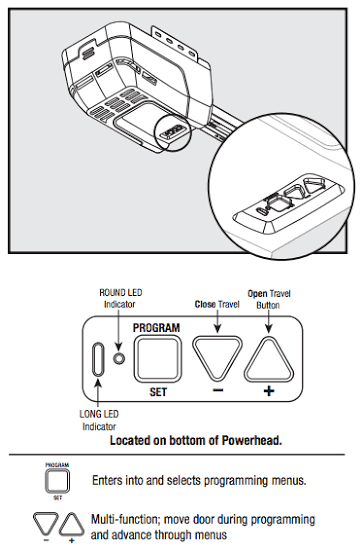
Step 1: Locate the Learn or Program Button
Find the Learn, Program, or Smart button on the garage door opener.
It is commonly located on the motor unit mounted to the ceiling, although the exact location varies by model.
You may need to remove a light cover or access panel to locate the button.
Common labels include:
LEARN
PROGRAM
SMART
SET
LEARN CODE
The button color and LED behavior can also vary between manufacturers and product generations.
Step 2: Activate Programming Mode
Press and release the Learn or Program button according to the instructions for your opener.
An indicator LED may illuminate or begin flashing to show that the opener is ready to receive a programming signal.
Step 3: Press the Remote Button
Select the button on the remote that you want to use.
Press or press and hold the button according to the programming instructions for your opener.
Some systems confirm successful programming through:
Flashing opener lights
A change in the Learn LED
Audible clicks
Another manufacturer-specific indicator
Do not assume that every garage door opener uses the same confirmation signal.
Step 4: Wait for Confirmation
Watch the opener's indicator light or listen for the confirmation signal.
Once the opener confirms that the remote has been learned, the programming process is complete.
Step 5: Test the Remote
Stand at a safe operating position and press the programmed remote button.
The garage door should respond normally.
Test the remote more than once to confirm that the wireless connection is reliable.
How to Program a Garage Door Opener Keypad
A wireless garage door keypad allows users to operate the garage door by entering a PIN instead of carrying a handheld remote.
The general programming process is similar to remote programming, but the keypad normally requires an additional PIN-entry step.
Step 1: Locate the Opener's Learn Button
Find the Learn or Program button on the motor unit.
Make sure the garage door and surrounding area are clear before activating programming mode.
Step 2: Activate Programming Mode
Press the Learn or Program button according to the opener's instructions.
The opener may display a flashing LED or another confirmation signal.
Step 3: Enter a PIN
Enter your desired personal identification number on the wireless keypad.
Depending on the model, you may need to press an additional Enter, Program, or similar button.
Step 4: Wait for Confirmation
The opener may flash its lights or provide another signal confirming that the keypad has been accepted.
Step 5: Test the Keypad
Close the garage door and enter the programmed PIN.
The opener should respond if the programming procedure has been completed successfully.
Choosing a Secure Garage Door Keypad PIN
Avoid simple combinations such as:
1234
0000
Your house number
Reused personal codes
A unique PIN provides better access control.
How to Program HomeLink to a Garage Door Opener
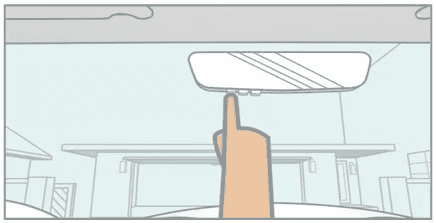
Many vehicles include HomeLink, an integrated wireless control system that can operate compatible garage doors, gates, and other devices.
HomeLink can work with both fixed-code and rolling-code systems, but the exact programming procedure depends on the vehicle and garage door opener.
Step 1: Position the Vehicle
Park the vehicle where you can safely access the garage door opener.
Keep the original handheld remote nearby during the initial training process.
Step 2: Train the HomeLink Button
Press and hold the selected HomeLink button while activating the original garage door remote according to the vehicle manufacturer's instructions.
The HomeLink indicator typically changes its flashing pattern when the signal has been learned.
Step 3: Complete Rolling-Code Training
If the opener uses rolling-code technology, an additional training step may be required.
The general process may include:
Locate the Learn, Smart, or Program button on the opener.
Activate the Learn function.
Return to the vehicle.
Press the programmed HomeLink button.
Repeat the button sequence if required.
Test the garage door.
The exact sequence and timing depend on the vehicle and opener.
Why HomeLink May Not Program
If HomeLink does not learn the garage door opener, check:
Remote battery condition
Remote compatibility
Distance between the remote and HomeLink
Vehicle-specific HomeLink instructions
Rolling-code requirements
Trying a fresh remote battery and adjusting the distance between the transmitter and vehicle may help resolve initial programming problems.
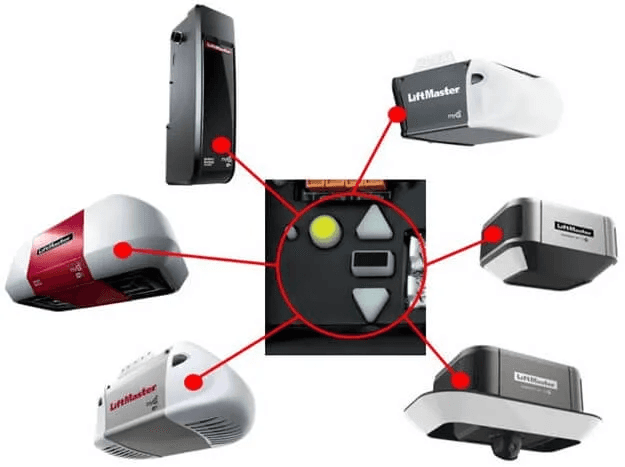
How to Program a LiftMaster Garage Door Opener
LiftMaster garage door openers use multiple generations of remote-control and security technology, so the exact sequence depends on the model.
LiftMaster Remote Programming
For many compatible LiftMaster systems, the general process is:
Locate the LEARN button.
Press and release the LEARN button.
Press and hold the desired button on the compatible remote.
Watch for the opener's confirmation signal.
Release the remote button.
Test the remote.
Some LiftMaster Security+ 2.0 systems use flashing opener lights or audible clicks as confirmation.
Check LiftMaster Remote Compatibility
Do not assume that every LiftMaster remote works with every LiftMaster opener.
Compatibility can depend on:
Opener generation
Security technology
Remote generation
Frequency
Model number
Always verify compatibility before purchasing a replacement remote.
How to Program a Chamberlain Garage Door Opener
Chamberlain garage door openers also use multiple generations of wireless technology.
For many current systems, programming involves the Program or Learn button on the opener followed by activation of a compatible remote.
Chamberlain Remote Programming
A typical process includes:
Make sure the garage door area is clear.
Locate the Program or LEARN button.
Activate programming mode.
Press the desired button on the compatible remote.
Wait for the confirmation signal.
Test the remote.
The precise button sequence depends on the opener and remote model.
Chamberlain Opener Compatibility
Compatibility can depend on the opener's security technology and Learn-button configuration.
When purchasing a replacement remote, check the exact opener and remote model numbers rather than relying on brand name alone.
How to Program a Genie Garage Door Opener
Genie garage door openers can use Intellicode rolling-code technology.
Intellicode changes the security code used by the system, providing a different approach from older fixed-code systems.
Genie Intellicode Programming
The exact procedure depends on the Genie opener and remote generation.
Some Genie Intellicode remotes use the Learn Code button and a sequence involving the remote button and the opener's indicator LED.
Because Genie has multiple product generations, identify the opener model before following a specific programming sequence.
Intellicode vs. Fixed-Code Systems
A fixed-code remote uses a predetermined code.
An Intellicode rolling-code system changes its security code as the opener is operated.
As a result, a remote designed for an older fixed-code system may not be compatible with a newer Intellicode opener.
How to Program a Universal Garage Door Remote
Universal remotes are designed to work with multiple brands or opener systems, but they still require compatibility.
Before programming a universal remote, identify:
Garage door opener brand
Opener model
Learn-button type
Frequency
Security technology
Supported remote types
Some universal remote systems support both Learn-button systems and older DIP-switch systems, but the programming method can be completely different.
Always check the universal remote's compatibility list before purchasing or programming it.
How to Program an Older Garage Door Opener
Older garage door openers may require a different programming process because they may use fixed-code technology.
Look for DIP Switches
A fixed-code opener may contain a group of small DIP switches inside the motor unit or remote.
The switch configuration may need to match between the transmitter and receiver.
Check the Original Documentation
If the opener has no Learn or Program button:
Find the opener model number.
Identify the transmitter model.
Determine the coding system.
Check the manufacturer's documentation.
Follow the model-specific procedure.
Older openers can have significantly different programming requirements, so avoid applying a modern Learn-button procedure without verifying compatibility.
How to Reset a Garage Door Opener Remote
The term "reset" can refer to two different operations.
The first is reprogramming one remote.
The second is erasing all stored remote codes from the opener.
These operations should not be treated as the same.
Reprogram One Remote
If a remote stops working, it may only need to be programmed again.
Before doing anything more complicated:
Replace the battery.
Check compatibility.
Repeat the programming process.
Test the remote.
Erase All Remote Codes
Some garage door openers allow you to erase all stored remotes and keypads from memory.
This function can be useful when:
A remote is lost
A remote is stolen
A new homeowner takes control of the system
Access permissions need to be changed
The entire system needs to be reconfigured
Be careful when using a full memory erase because previously programmed devices may need to be paired again.
Garage Door Remote Not Programming? Troubleshooting Guide
If your garage door remote will not program, work through the following checks before assuming the opener motor or control board is defective.
Check the Remote Battery
A weak battery can prevent reliable signal transmission.
Install a fresh battery and attempt programming again.
Confirm Remote Compatibility
Check the opener and remote model numbers.
A remote may fail to program simply because it uses a different security technology, frequency, or coding system.
Make Sure You Are Using the Correct Button
Some openers have multiple buttons, LEDs, and control functions.
Make sure you are using the correct Learn, Program, or Smart button.
Follow the Programming Timing Carefully
Some programming modes remain active only for a limited period.
If the remote is not activated within the required programming window, restart the process.
Check the Opener's Power
Make sure the opener is connected to power and that the control board and indicator LEDs behave normally.
If the opener itself does not respond to the wall control, the problem may not be related to the remote.
Test the Wall Control
Press the interior wall-mounted control.
If the wall control operates the door but the remote does not, the problem is more likely associated with:
Remote battery
Remote compatibility
Programming
Wireless receiver
Remote transmitter
If neither the wall control nor remote operates the opener, additional diagnosis may be necessary.
Check for Mechanical Problems
Make sure the garage door can move freely and safely.
A programming issue and a mechanical problem can sometimes appear similar because the garage door does not move when the remote is pressed.
Review the Model-Specific Manual
The most reliable source for exact programming instructions is the manual for the specific opener and remote.
Brand names alone are not always sufficient because manufacturers can use different programming systems across product generations.
How Garage Door Opener Programming Relates to the Motor and Control System
Programming is only one part of a garage door opener system.
A typical automatic garage door system operates through several interconnected components:
Remote / Keypad / Vehicle Control
↓
Wireless Receiver
↓
Control Board
↓
Motor and Drive System
↓
Garage Door
When a programmed remote is activated, the receiver recognizes the wireless signal and passes the command to the control system. The control system then instructs the motor and drive mechanism to operate the garage door.
This means that a programming failure does not always mean that the remote itself is defective.
A faulty receiver, control board, power supply, wiring connection, or motor system can create symptoms that look like a remote-programming problem.
Why Motor Performance Matters
The motor is responsible for delivering the torque required to move the garage door through its operating cycle.
For manufacturers and system integrators, motor performance affects factors such as:
Starting torque
Operating speed
Noise
Energy consumption
Duty cycle
Reliability
Thermal performance
Overall system life
The motor, control electronics, drive mechanism, and safety system must work together to create reliable automated door operation.
When Should You Replace a Garage Door Opener?
Programming problems can sometimes indicate a larger equipment issue.
Professional inspection or replacement may be worth considering when the opener has:
Repeated programming failures
An unreliable receiver
An aging control board
Excessive motor noise
Intermittent operation
Slow or inconsistent movement
Frequent overheating
Persistent wireless communication problems
Outdated safety features
A replacement may also make sense when an older opener no longer supports the remote, keypad, vehicle, or smart-home features required by the application.
Frequently Asked Questions About Garage Door Opener Programming
How long does it take to program a garage door opener?
For many modern systems, programming a compatible remote can take only a few minutes. The exact time depends on the opener, remote, and programming method.
Why won't my garage door remote program?
Possible causes include an incompatible remote, weak battery, incorrect programming sequence, missed timing, or a problem with the opener's receiver or control system.
Start by checking compatibility and replacing the remote battery before investigating more complex causes.
Can I program a new garage door remote without the original remote?
Often, yes.
Many garage door openers allow a compatible new remote to be programmed directly through the opener's Learn or Program function. The original remote is not necessarily required, although some vehicle-based systems and specific security technologies may have different requirements.
Can I program multiple remotes to one garage door opener?
Many modern garage door openers support multiple compatible remotes.
The maximum number depends on the opener model and its memory capacity.
How do I know if my garage door opener uses rolling code?
Look for information such as:
Security+
Security+ 2.0
Security+ 3.0
Intellicode
Rolling-code technology
Model-specific information in the owner's manual
The manufacturer's documentation is the most reliable way to confirm the system.
How do I program a garage door opener to my car?
If your vehicle supports HomeLink, first train the HomeLink button using the original handheld remote, then complete the rolling-code training procedure if required by the opener.
The exact steps depend on the vehicle and garage door opener.
Why does my HomeLink programming fail?
Check the remote battery, verify compatibility, try a different distance or angle between the remote and HomeLink button, and confirm whether the garage door opener requires additional rolling-code training.
Can I program a universal remote to any garage door opener?
No.
A universal remote still requires compatibility with the opener's frequency, coding system, and programming method.
Always verify compatibility before purchasing a universal remote.
What if my garage door opener has no Learn button?
It may use an older fixed-code or DIP-switch system.
Identify the opener model and follow its specific programming instructions instead of applying a standard modern programming procedure.
Do I need to reset the garage door opener before programming a new remote?
Usually, no.
If you are simply adding a compatible remote, you can normally program the new device without deleting previously programmed remotes.
A complete memory erase is generally used when security settings need to be reset or when lost or stolen remotes need to be removed.
Final Thoughts
Learning how to program a garage door opener is usually simple when the correct remote and programming method are used.
For many modern systems, the basic concept is straightforward: identify the opener, confirm compatibility, activate the Learn or Program function, pair the remote or accessory, and test the system.
However, the exact button sequence, timing, confirmation signal, and compatibility requirements can vary significantly between models and generations.
When programming does not work, start with the basics: check the battery, confirm compatibility, verify the programming sequence, and make sure the opener itself is receiving power and responding correctly.
Understanding the complete garage door opener system is equally important. Reliable operation depends not only on the wireless remote, but also on the receiver, control electronics, motor, drive mechanism, and safety systems working together.
For garage door opener manufacturers and automation-system developers, dependable motor performance and a reliable control architecture are essential to building safe, efficient, and durable automatic door systems.
CHINA-DEVELOP provides motor and motion-control solutions for demanding automated applications, helping manufacturers develop reliable drive systems for garage door and other automation applications.
For detailed motor specifications, application requirements, or customized motor solutions, contact CHINA-DEVELOP to discuss your project.
FAQ
What does programming a garage door opener mean?
Programming a garage door opener means pairing a compatible remote, keypad, vehicle control, or other device with the opener's receiver so the system recognizes and responds to the device.
How do I program a garage door opener remote?
For many modern openers, locate the Learn or Program button, activate programming mode, press the desired button on the compatible remote, wait for the confirmation signal, and test the remote. Exact steps vary by model.
Why won't my garage door remote program?
Possible causes include an incompatible remote, weak battery, incorrect programming sequence, missed timing, or a problem with the opener's receiver or control system.
Can I program a garage door opener to my car?
Yes. Vehicles equipped with compatible HomeLink systems can often be programmed to operate garage door openers. Rolling-code openers may require an additional training step.
Can I program multiple remotes to one garage door opener?
Yes, many modern garage door openers support multiple compatible remotes. The maximum number depends on the opener model.
What if my garage door opener has no Learn button?
It may use an older fixed-code or DIP-switch system. Identify the opener model and follow its specific programming instructions.
Do I need to erase old remotes before adding a new one?
Usually not. A compatible new remote can often be added without deleting existing devices. A complete memory erase is normally used when security settings need to be reset.
Are all garage door opener remotes compatible?
No. Compatibility depends on the opener model, remote technology, frequency, and security system. Always verify compatibility before purchasing a replacement remote.
Other Blogs